← Back to Portfolio

Studio Tax App Redesign

making tax filing less painful with a modern interface that actually makes sense

Role

UI/UX Designer

Duration

1 Week

Tools

Figma, Adobe XD, Illustrator

Platform

Web & Mobile

The Challenge

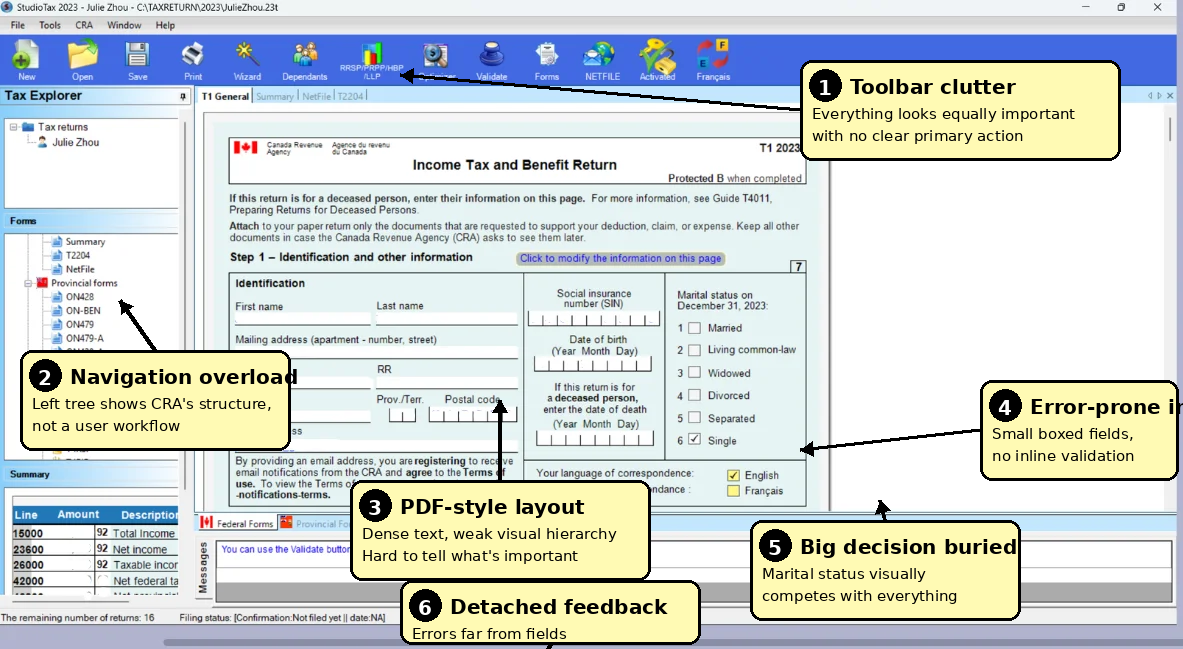
StudioTax looked like it was designed in the 90s and threw way too much at users at once. the interface used technical jargon nobody understood, had overwhelming menus everywhere, and confusing navigation that made filing taxes super stressful.

Main Issues

Information Overload

the toolbar had 15+ icons crammed together, endless menu options, and super dense forms. everything was visible at the same time which completely overwhelmed users

Confusing Navigation

the menu used cryptic government form codes like T2204 and ON428 instead of plain language. nobody thinks in terms of form numbers, they just want to enter their income or claim deductions

Poor Error Handling

there was no inline validation at all. users would fill out entire sections and errors would only show up after they hit submit, making it super hard to figure out which field had the problem

Tiny Inputs

input fields were tiny and hard to click on. there was no formatting help for things like SIN numbers or currency amounts, so people made tons of mistakes

Goal: create a modern, intuitive interface that guides users through the process step by step. give them instant feedback so they know they're doing it right, and use plain language instead of confusing tax jargon

Research & Discovery

User Testing

i talked to 15 people who actually use tax software and watched them try to navigate through StudioTax. here's what i found:

confused by tax jargon and form codes 68%
wanted help tooltips / explanations 82%
couldn't figure out navigation 91%
no idea if section was complete 85%
made mistakes due to small inputs + no validation 73%

key takeaway: everyone wanted some kind of progress tracking so they knew how much was left. the outdated design also made people really nervous about entering their personal tax info

Design Process

Navigation Overhaul

the first thing i tackled was the navigation. i reorganized everything around actual user tasks instead of those cryptic form codes. managed to simplify it from 12 confusing steps down to just 7 clear ones
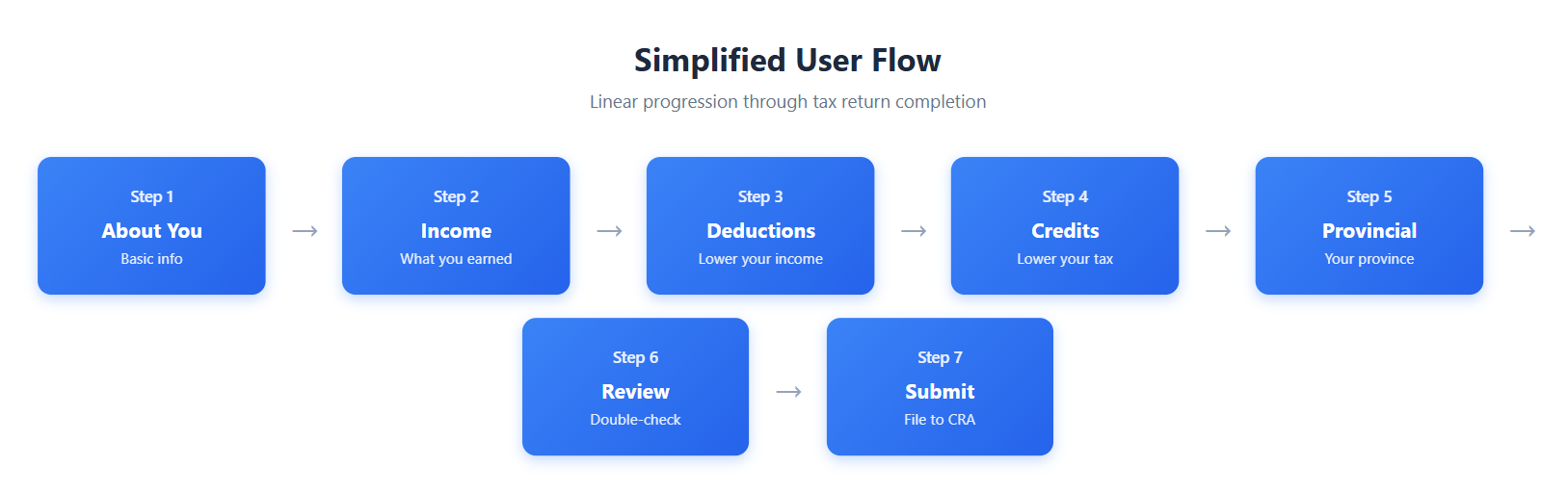
User flow diagram

Wireframes & Prototyping

i started with rough wireframes to test out different layouts. tested them with users, gathered feedback, made changes based on what i learned. then i built high-fidelity prototypes in Figma so everyone could actually click through and experience how it would work

Wireframe Sketches

early-stage layout explorations

Dashboard / Home
entry point for new and returning users
Welcome back!
Your 2023 Tax Return
35% complete
Continue Return
Main Layout
sidebar navigation + content area
NAVIGATION
Personal Info
Income
Deductions
Credits
Review
Income
Form Section
personal information entry
Personal Details
First Name *
Last Name *
SIN *
DOB *
💡 Why we need this
Income Section
T4 employment income entry
Employer 1
Remove
Employer Name
Income
Tax
+ Add Another
Income Summary
calculated totals table
Employment income
$75,000
Investment income
$2,450
TOTAL INCOME
$77,450
Review & Submit
final check before filing
Expected Refund
$2,845
Submit to CRA →
Mobile Layout
responsive single-column
☰ Menu
StudioTax
Step 2 of 7: Income
Employer Name
Income
Continue
Validation & Errors
error handling pattern
Social Insurance Number *
⚠️ Please enter a valid 9-digit SIN
First Name * ✓
⚠️ 2 fields need attention
Please fix the errors above
Design Solutions

Before

Old interface with annotations
  • Cluttered interface
  • Poor visual hierarchy
  • Confusing navigation
  • Overwhelming forms

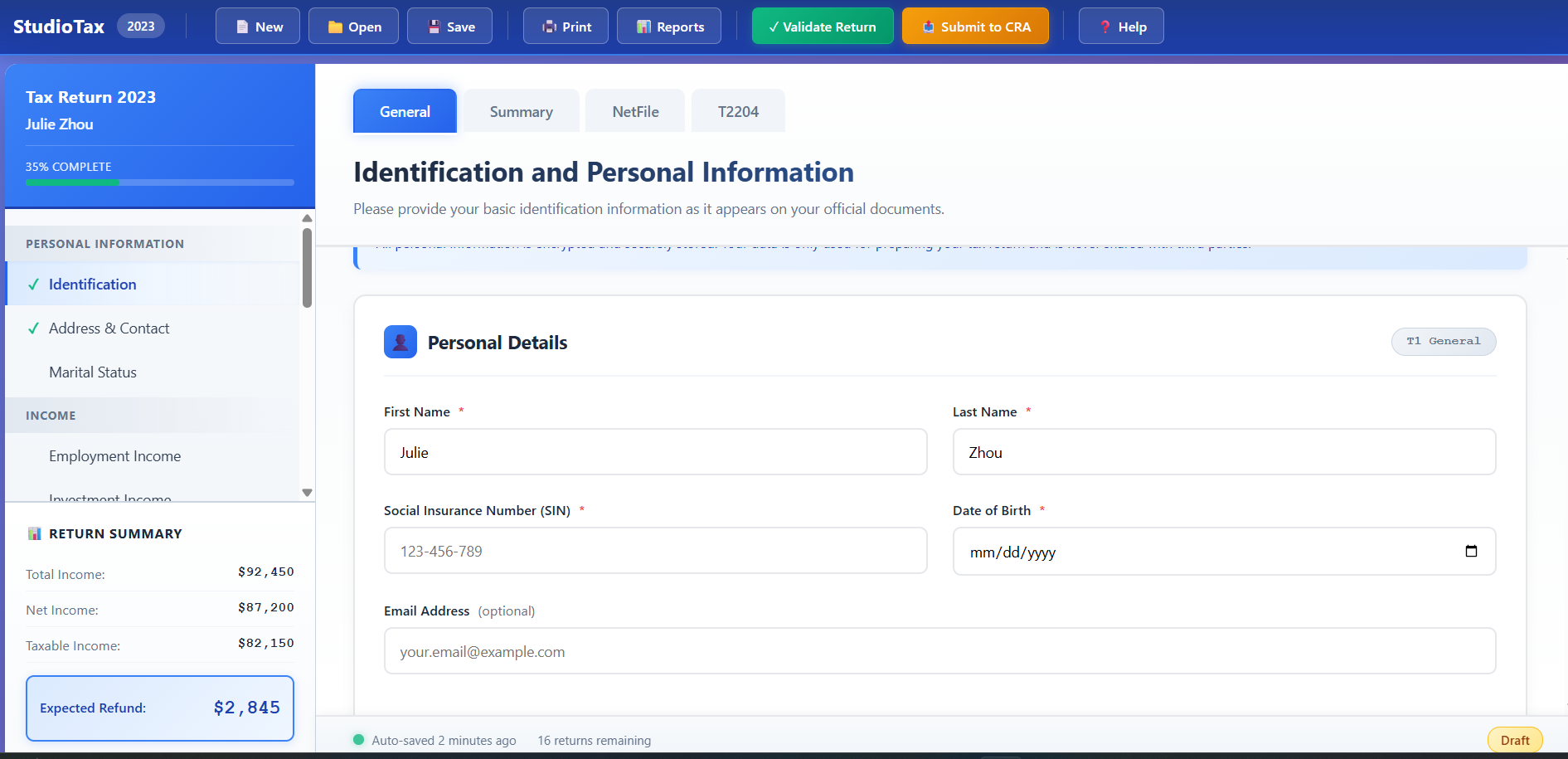
After

New redesigned interface
  • Clean, modern layout
  • Clear visual hierarchy
  • Intuitive navigation
  • Progressive disclosure
Progress

Clear Progress Tracking

Visual progress bar shows exactly where you are

Help

Contextual Help

Tooltips explain terms right where you need them

Focus

Progressive Disclosure

Only shows relevant information at each step

Valid

Real-time Validation

Instant feedback with smart suggestions

Mobile

Mobile Responsive

Works seamlessly on any device

Secure

Clear Security

Transparent data protection messaging

Impact & Results

42%
Reduction in Abandonment Rate
65%
Faster Task Completion
89%
User Satisfaction Score
-73%
Support Tickets Reduced

Key Learnings

breaking things down works

showing less information at once made a huge difference. when you split complex tasks into smaller, manageable steps, people feel way more confident and in control of what they're doing

help when you need it

inline tooltips ended up being everyone's favorite feature. instead of making people read through big tutorials upfront, putting help right next to the confusing stuff actually worked. people used them and said it made everything way clearer

test with real people

user testing caught so many assumptions i made that were totally wrong. things that seemed super obvious to me completely confused actual users. testing early and often saved me from making those mistakes in the final design

what's next

  • AI suggestions: smart recommendations based on your specific situation and past tax returns
  • auto-import documents: use OCR technology to pull data from photos of your tax slips
  • more languages: make it accessible to non-English speakers
  • year-round planning: tools to help you optimize taxes throughout the year, not just during tax season